
Report card release dates will be provided by Continuing Education. Report cards are typically available approximately one week after the end of the full school session.
To access your final report card, log in to the Continuing Education Student Portal and select Personal from the top menu. Then choose Digital Documents to view, download, and save a copy of your report card.
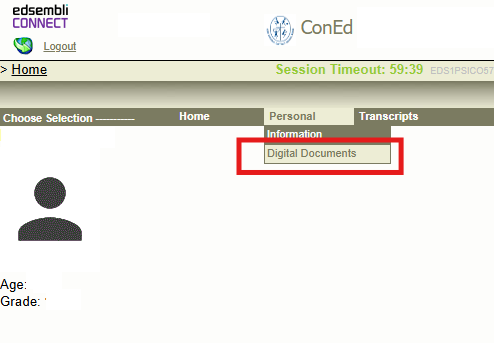
Please review the instructions below and follow the section that applies to you:
For YCDSB Students:
If you are a YCDSB secondary student, you must access your report card through your home school’s Student Portal using the Student tab on your home school’s website. Using the correct portal link, log in with your YCDSBK12 email address and password.
You will see more than one school listed in the Digital Documents school drop-down menu, please select the appropriate school to access the correct report card.
NOTE:
- All Grade 12 marks will be uploaded to OUAC and OCAS according to the Ministry’s required deadlines. No exceptions will be made.
- If you are having difficulty accessing your report card, please submit a ticket through: help.ycdsb.ca/vle.
For NON-YCDSB Students:
Non-YCDSB students will be able to access their report card online at the end of the Summer School or Night School session.
Please visit the Continuing Education Student Portal and select the appropriate school:
ConEd Elearn Summer School (CELSU)
For asynchronous eLearning classes
ConED Summer School (CESU)
For synchronous remote and in-person classes
ConED Night School
For Night School classes
Using the correct portal link, log in with your YCDSBK12 email address and password. To access your final report card, select Personal from the top menu, then choose Digital Documents to view, download, and save a copy of your report card.
NOTE:
- All Grade 12 marks will be uploaded to OUAC and OCAS according to the Ministry’s required deadlines. No exceptions will be made.
- Non-YCDSB day school Grade 12 students must manually add the appropriate Continuing Education school to the Academic Background section of their university or college application: “YCDSB Summer School“, “YCDSB Night School” or “YCDSB Elearn” Please complete this soon after registration to avoid unnecessary delays or application issues.
- YCDSBK12 Google Workspace accounts are temporary and are only available for the school term. Report cards will only remain available online for approximately two months after the report card release date. Please download and save a copy for your records.
- If you are having difficulty accessing your report card, please submit a ticket through: help.ycdsb.ca/vle.